How to get a job in the Salesforce ecosystem

Here are the steps to land a fantastic job in the Salesforce ecosystem.

Step 1: Sign up for trailhead

Step 2: Pick a trailhead track

Step 3: Spend 3-4 months learning as much as you can from that track

Step 4: Get certified

Step 5: Try to find a business or company that will let you work on their Salesforce platform for free

Step 6: Apply to jobs and do the best you can

Now you have a Salesforce job!

Integrating Salesforce Orders with Quickbooks Pt. 6

[This is part of our series of posts where we outline how to connect Salesforce with Quickbooks. You can check out pt. 1 here.]

Today we’ll go through the API callout class. It’s simple- we assemble the JSON string and then call Quickbooks.

The first series of code we’ll look at is how we are assembling the JSON string for an invoice item:

Assembling the JSON string

I couldn’t find a better way to assemble the JSON string, so we do it the hard way!

When you callout from Salesforce you have to set the URL as an accepted remote server. And, any method that calls the HTTP class has to have the @Future(callout=true) keyword prepended to the method signature.

Here is the interesting code:

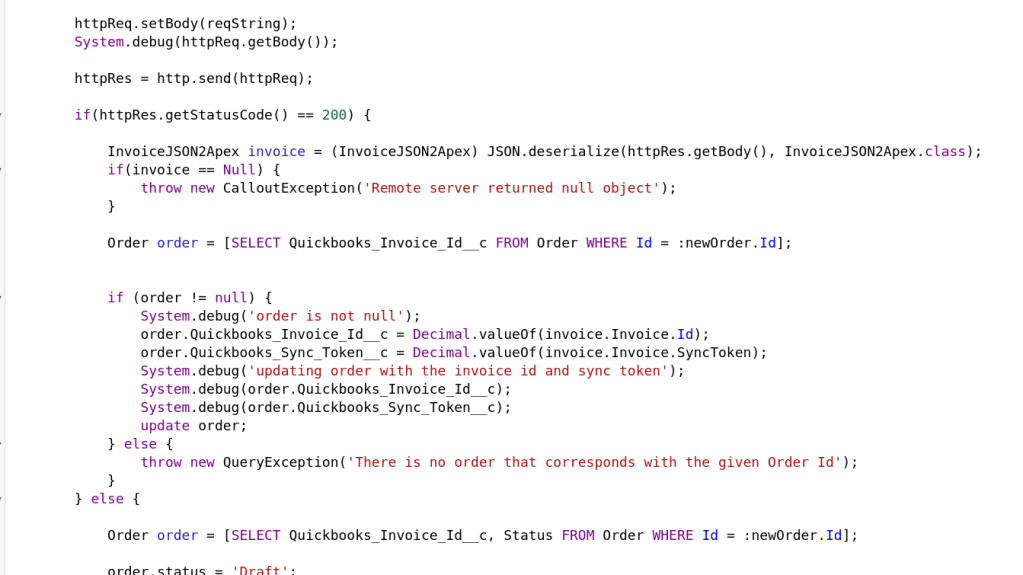
Calling out to Quickbooks

Here we set the httpReq object’s body property to equal our JSON String.

Then, we call the http.send method and ship our request to Quickbooks through the wonder of the interwebs!

The rest of the code is deserializing the invoice object that comes back and checking for errors.

That’s about it! Let me know if you have any questions!

Integrating Salesforce Orders with Quickbooks pt. 5

[This is a part of a series reviewing how we integrated Salesforce with Quickbooks. See part 1 here.]

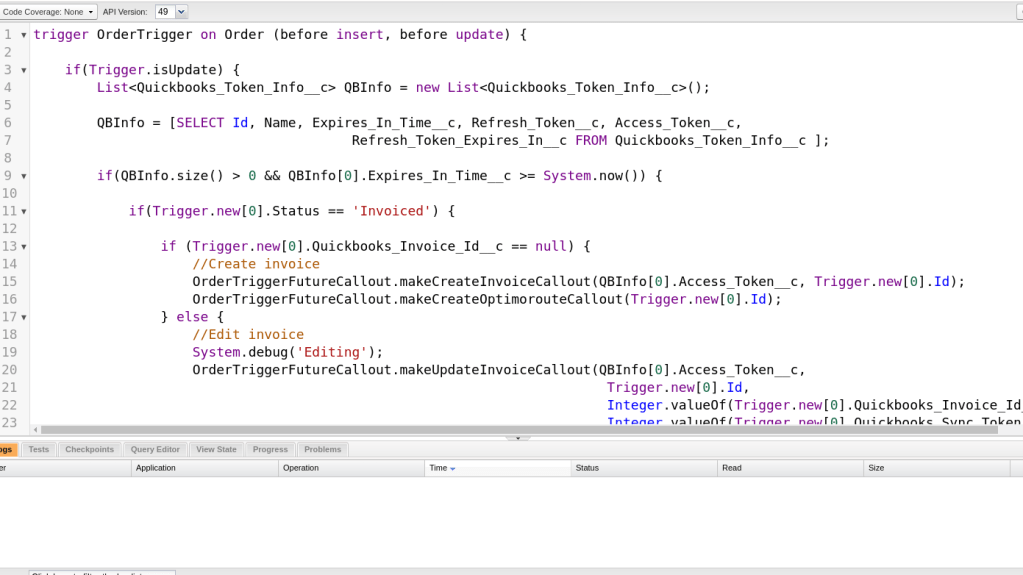
We’ll review the code for our trigger today. Salesforce provides multiple template classes for asynchronous processes. We decided that given our needs with this integration we should use the Trigger class as a listener on account updates. However, our callout code can be used with some of the other asynchronous classes depending on the specific need of the organization.

Anyway, let’s dive into some code!

Pay close attention to a couple of lines here. Line 6 checks if the order object is being updated. We don’t want to callout to Quickbooks on an order creation because there is some information we need to calculate on the order. However, we listen for order updates and fire if an order’s status is set to “invoice”.

There is some other logic in there just to dot some i’s and cross some t’s but that is the most important sequence of logic statements.

Here is the rest of the important logic for interacting with Quickbooks. We have three primary conditions when we contact Quickbooks and we needed to handle all of them.

  1. The order has not yet been created on the Quickbooks side
  2. The order has been created on the Quickbooks side and we have new information to add to Quickbooks (“Editing”).
  3. We want to void the order on Quickbooks.

I have omitted all of the error handling code because it’s not that interesting.

That’s about it for our Trigger code! I’ll be covering the API callout code in our next few posts. Let me know if you have any questions!

Integrating Salesforce Orders with Quickbooks Pt. 4 – Introducing Our Trigger

[This is part of a series on integrating Salesforce with Quickbooks. See parts 1, 2, and 3 to catch up.]

Now that we’ve handled Intuit’s Oauth2 security authorization we can start building out the functionality of our integration.

Sputnik Coffee co. desired a “one touch” process. In other words, they wanted to press one button and Salesforce takes care of the rest.

Our approach with our solution was to use a Salesforce “trigger” to listen on an order status. If the status changes to “invoice” (i.e. the order is completed) the trigger activates.

The architecture is simple- Salesforce trigger listens for invoiced orders and then runs a web callout to Quickbooks API with the order info.

However, there were quite a few complications with implementation that I’ll go over in later posts.

That’s it for now. I’ll go over the code of the Salesforce trigger in our next post!

Integrating Salesforce Orders With Quickbooks Pt. 3

In the last post we discussed our lightning component and how it enables us to interact with the Intuit Oauth2 authentication system. If you haven’t seen that one yet you can check out part 2 here. (Also, here’s part 1).

Today we’re going to dive in to the code for contacting the Intuit Oauth2 system and how we get an access token.

The system requires a multi-step authentication system and it is not a trivial design.

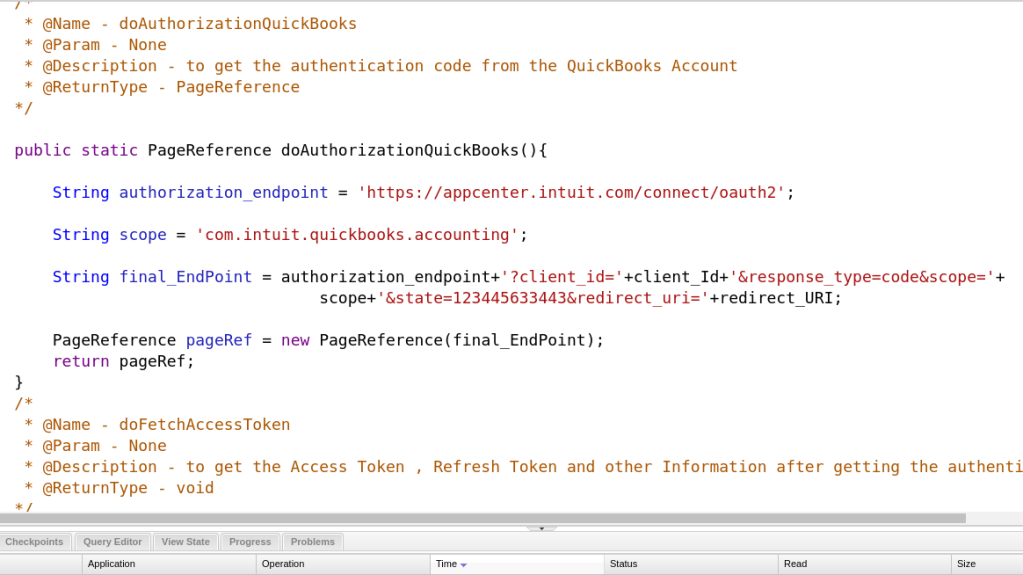
We need to contact the Intuit Oauth2 API with both our client Id and our consumer secret (these can be created through the Quickbooks developer account).

We’ll include both of these as parameters in the URL.

Our doAuthorizationQuickBooks method returns a PageReference object. This will be the page where we can log in to Quickbooks.

Once we enter our login info and successfully login to Quickbooks, we will receive the access token.

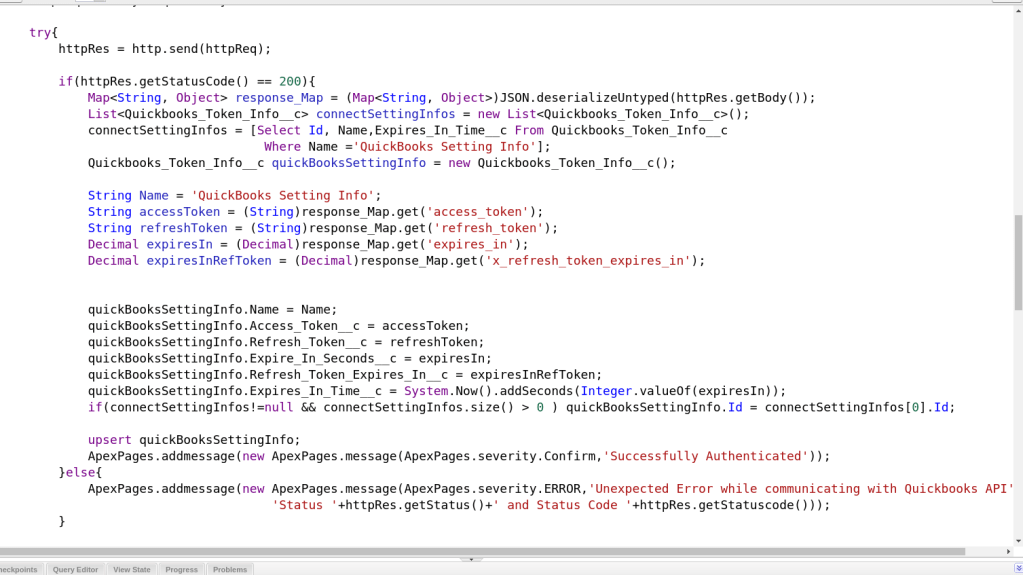
This is the method that completes the connection process:

This code is pretty straightforward, just a simple network call. Once we receive the token we save it as an object on our Salesforce system so we can access it when we make API calls to Quickbooks.

That’s about it for handling the Intuit Oauth2 security!

Integrating Salesforce Orders with Quickbooks Pt. 2

This post is a continuation of the series started here.

Quickbooks has a lot of great features and is a lot of fun to play around with. Intuit even offers a whole sandbox so we don’t have to mess with our organizational data/ workflow during development.

But, before we get to the meat of the invoice flow, we had to develop a system to integrate with Quickbooks’ Oauth2 authentication.

Here’s how we did it.

We have a lightning component that lives on our primary sales dashboard. When our organization wants to invoice client’s for their orders, we click to “Authorize with Quickbooks”. This opens up an intuit login page. We login with our organizational email and password and Salesforce receives a token. Then, we click to “complete authorization” and subsequently verify the token with Intuit. Once this process is complete we can integrate our data with Quickbooks.

The lightning component includes a text field that identifies whether the token is valid.

Here is the relevant screenshot of the lightning component:

Check out my next post for a deeper dive into the Oauth code!

Integrating Salesforce Orders with Quickbooks Pt. 1

Sputnik coffee company has an irritating problem. Currently, their clients use a web portal to place orders on the Salesforce system.

This order system is working well- but the problem is that Sputnik uses Quickbooks as their accounting software.

Every new order requires a cut and paste of the order’s info into Quickbooks. This is a grueling process and is not scalable as Sputnik continues its rapid growth of new accounts and more orders.

Sputnik is very unhappy spending several hours a week cutting and pasting order information from Salesforce to Quickbooks. So, they asked me to help!

After considering the problem I proposed that we build an apex “trigger” that fires the invoice information to Quickbooks when the invoice is completed.

This ended up not being a trivial solution for a few reasons, the first being that Quickbooks requires Oauth2 authorization. Also, the Quickbooks System is somewhat complicated.

What follows in this series is our solution that freed up several hours a week for the Sputnik employees.

Thanks for reading, and look out for part 2- How did we handle the Oauth2 security authoritzation?

Largest Palindrome Product of 3 Digit Numbers

A palindromic number reads the same both ways. The largest palindrome made from the product of two 2-digit numbers is 9009 = 91 × 99.

Find the largest palindrome made from the product of two 3-digit numbers.

This one was tough.

I ended up calculating every palindrome for every 3 digit number, saving it into a list, sorting the list and returning the largest number. I also had to look up a good palindrome detection algorithm.

Here is the psuedo code:

for every number between 100 and 999

for every number between 100 and 999

if the product is a palindrome add the number to the list

return the list

is a palindrome

This algorithm works by shaving off every digit of the existing number, adding it to a “reverse” variable, and then multiplying by 10 to transform the reverse variable over. If the numbers are equal return true.

This yields the correct answer!

Let me know in the comments below if you have a better algorithm.

Even Fibonacci Sums

Each new term in the Fibonacci sequence is generated by adding the previous two terms. By starting with 1 and 2, the first 10 terms will be:

1, 2, 3, 5, 8, 13, 21, 34, 55, 89, …

By considering the terms in the Fibonacci sequence whose values do not exceed four million, find the sum of the even-valued terms.

This one was tricky. I used four variables to track the current number in iteration, the last number to add to the current number, an accumulator to add up the even fibonacci numbers and a temp variable to save the current number.

So…

while current number is less than 4,000,000

temporary variable gets current number (because we need to transform the current number but also save it into the trailer)

check if current number modulo 2 is zero (is current number even)

if yes, add current number to accumulator


current number plus the trailer value (initialized to 1 to begin)

trailer gets temporary variable

continue loop


return accumulator


This yields the correct result!



Project Euler Programming Puzzles!

I’ve been doing the projecteuler.net coding puzzles. I’m going to blog about my design decisions (I won’t post any actual code nor results, just pseudo code).

#1: Multiples of 3 and 5

If we list all the natural numbers below 10 that are multiples of 3 or 5, we get 3, 5, 6 and 9. The sum of these multiples is 23.

Find the sum of all the multiples of 3 or 5 below 1000.

Let’s break this problem down into subproblems.

First, we need to iterate through every number less than 1000.

Secondly, we need to check if the number is a multiple of 3 or 5.

Thirdly, if the number is a multiple of 3 or 5 we need to add it to an accumulator.

Finally, we will return the accumulator.


So my solution looks like this:

while i is less than 1000

if i modulo (remainder after division) 3 or 5 equals 0

accumulator + i

return i


This yields the correct answer!