
[This is a part of a series reviewing how we integrated Salesforce with Quickbooks. See part 1 here.]
We’ll review the code for our trigger today. Salesforce provides multiple template classes for asynchronous processes. We decided that given our needs with this integration we should use the Trigger class as a listener on account updates. However, our callout code can be used with some of the other asynchronous classes depending on the specific need of the organization.
Anyway, let’s dive into some code!
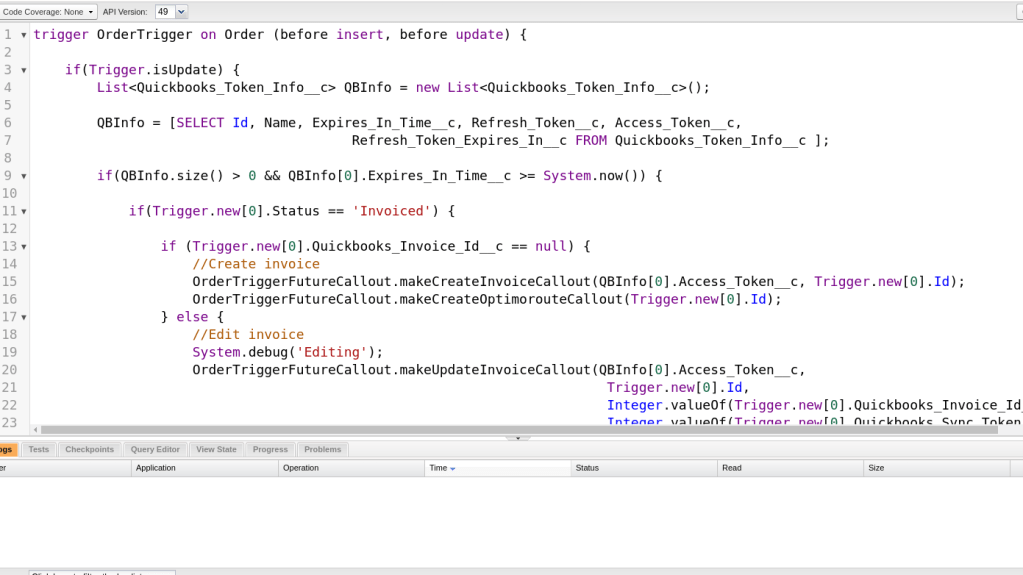
Pay close attention to a couple of lines here. Line 6 checks if the order object is being updated. We don’t want to callout to Quickbooks on an order creation because there is some information we need to calculate on the order. However, we listen for order updates and fire if an order’s status is set to “invoice”.
There is some other logic in there just to dot some i’s and cross some t’s but that is the most important sequence of logic statements.

Here is the rest of the important logic for interacting with Quickbooks. We have three primary conditions when we contact Quickbooks and we needed to handle all of them.
- The order has not yet been created on the Quickbooks side
- The order has been created on the Quickbooks side and we have new information to add to Quickbooks (“Editing”).
- We want to void the order on Quickbooks.
I have omitted all of the error handling code because it’s not that interesting.
That’s about it for our Trigger code! I’ll be covering the API callout code in our next few posts. Let me know if you have any questions!
 the paranoid android