
Today we’ll go through the API callout class. It’s simple- we assemble the JSON string and then call Quickbooks.
The first series of code we’ll look at is how we are assembling the JSON string for an invoice item:

I couldn’t find a better way to assemble the JSON string, so we do it the hard way!
When you callout from Salesforce you have to set the URL as an accepted remote server. And, any method that calls the HTTP class has to have the @Future(callout=true) keyword prepended to the method signature.
Here is the interesting code:
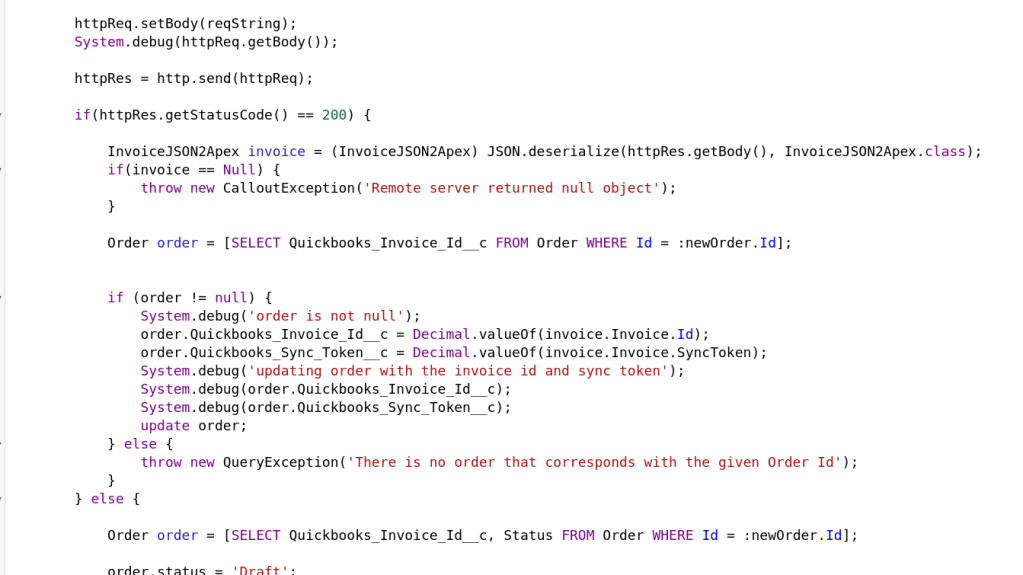
Here we set the httpReq object’s body property to equal our JSON String.
Then, we call the http.send method and ship our request to Quickbooks through the wonder of the interwebs!
The rest of the code is deserializing the invoice object that comes back and checking for errors.
That’s about it! Let me know if you have any questions!
 the paranoid android